
What Is Local Processing and Why Is It the New Standard for Web Tools?
Local processing means your data never leaves your device. Learn why client-side, WebAssembly-powered tools are faster, safer, and replacing cloud utilities.
What Is Local Processing and Why Is It the New Standard for Web Tools?
File contents are processed locally. Loading the website or tool dependencies and using optional consented services can still make network requests. Check the payloads, not just whether a request exists; one inspection cannot guarantee future website behavior.
This shift is happening now, powered by WebAssembly. It makes cloud-based file converters, formatters, and utilities increasingly obsolete for personal tasks. Here is why it matters and why you should care.
Why Did We Ever Use Cloud Tools for Simple Tasks?
Picture this. You are wrapping up a sprint, and you need to quickly format a massive, unreadable block of JSON. Or maybe you need to convert a sensitive PDF containing financial projections using a PDF tool.
What is your first instinct? You probably open a new tab, Google "free JSON formatter" or "PDF converter," click the top result, and drop your file into the browser.
Stop right there. Where did that file just go?
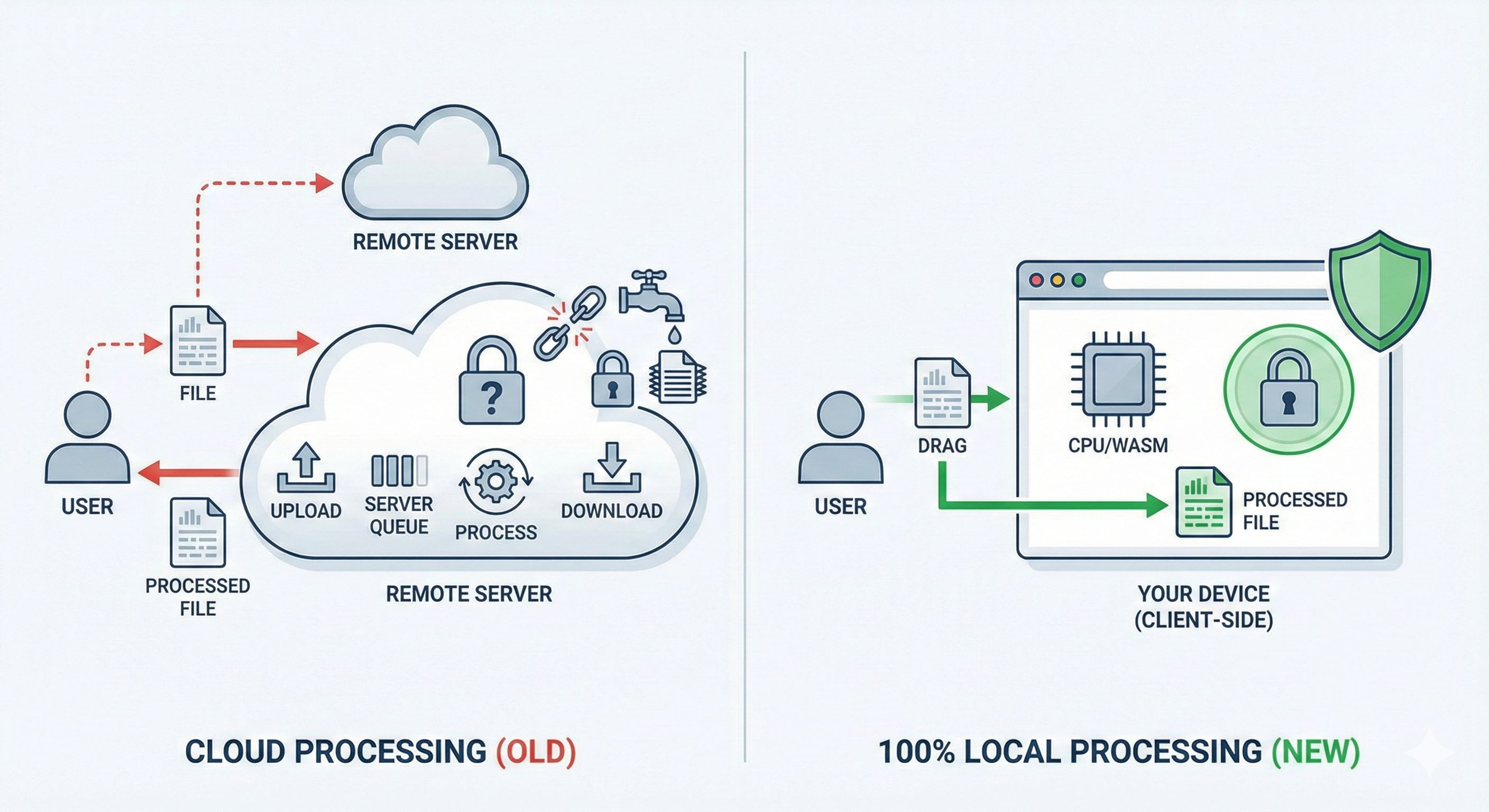
For a long time, the web development community accepted a simple trade-off: we outsourced heavy lifting to the cloud. We assumed the browser was just a dumb terminal, too weak to handle complex tasks. So, we built web apps that took user data, uploaded it to a server, processed it, and spat the result back out.
But things have changed. Browsers are incredibly powerful. Our laptops and phones carry massive amounts of compute. Pushing simple utility tasks to a remote server is no longer just inefficient — it is a massive, unnecessary security risk.
What Are the Hidden Costs of "Free" Cloud Utilities?
Running servers is not free. Paying for AWS compute to process millions of image conversions, PDF manipulations, and code formatting requests costs serious money. If an online utility is completely free, how are they keeping the lights on?
The answer usually falls into one of three buckets:
- Ad-heavy experiences: They wrap your workspace in intrusive banners, pop-ups, and tracking pixels.
- Premium paywalls: They let you process two files for free, then lock you out until you pay a monthly subscription.
- Data harvesting: They keep your data.
That last point is the scary one. When you upload a file to a remote server, you completely surrender control. You are trusting a random, unknown developer's security practices. You hope they delete your file after processing. You hope their AWS S3 buckets are properly configured. You hope their database isn't sitting wide open on the internet.
Data breaches happen every day. Hackers frequently target these seemingly harmless utility sites because they are honeypots of valuable data. Think about all the NDAs, tax forms, source code snippets, and proprietary datasets people blindly upload to these platforms.
For a simple format conversion, sending your data across the internet makes zero architectural sense.
What Is 100% Local Processing?
Local processing is an architecture where computation happens entirely on the user's device, inside the browser, with no data sent to any external server. Instead of sending your data to the code, the code is sent to your data — once, when the page loads.
When you use a locally processed web tool, the entire application downloads into your browser. Your browser then uses your device's CPU and memory to execute the task. Your data never touches a network cable. It never leaves your machine.
This is the core philosophy behind client-side architecture at Lokaltools. It transforms the browser from a simple document viewer into a secure, isolated sandbox for heavy computation.
Does Local Processing Actually Give You Better Privacy and Speed?
Yes — and the gains are substantial on both fronts.
Local processing and privacy
If your file never leaves your computer, it cannot be intercepted in transit. It cannot be stored on a forgotten server. It cannot be leaked in a database breach.
WebAssembly and browser APIs make local file processing possible. They do not prevent a website or its scripts from accessing the network. Privacy depends on the implementation, the scripts loaded and the data actually transmitted.
2. Blazing Fast Speed
Network latency is the enemy of productivity.
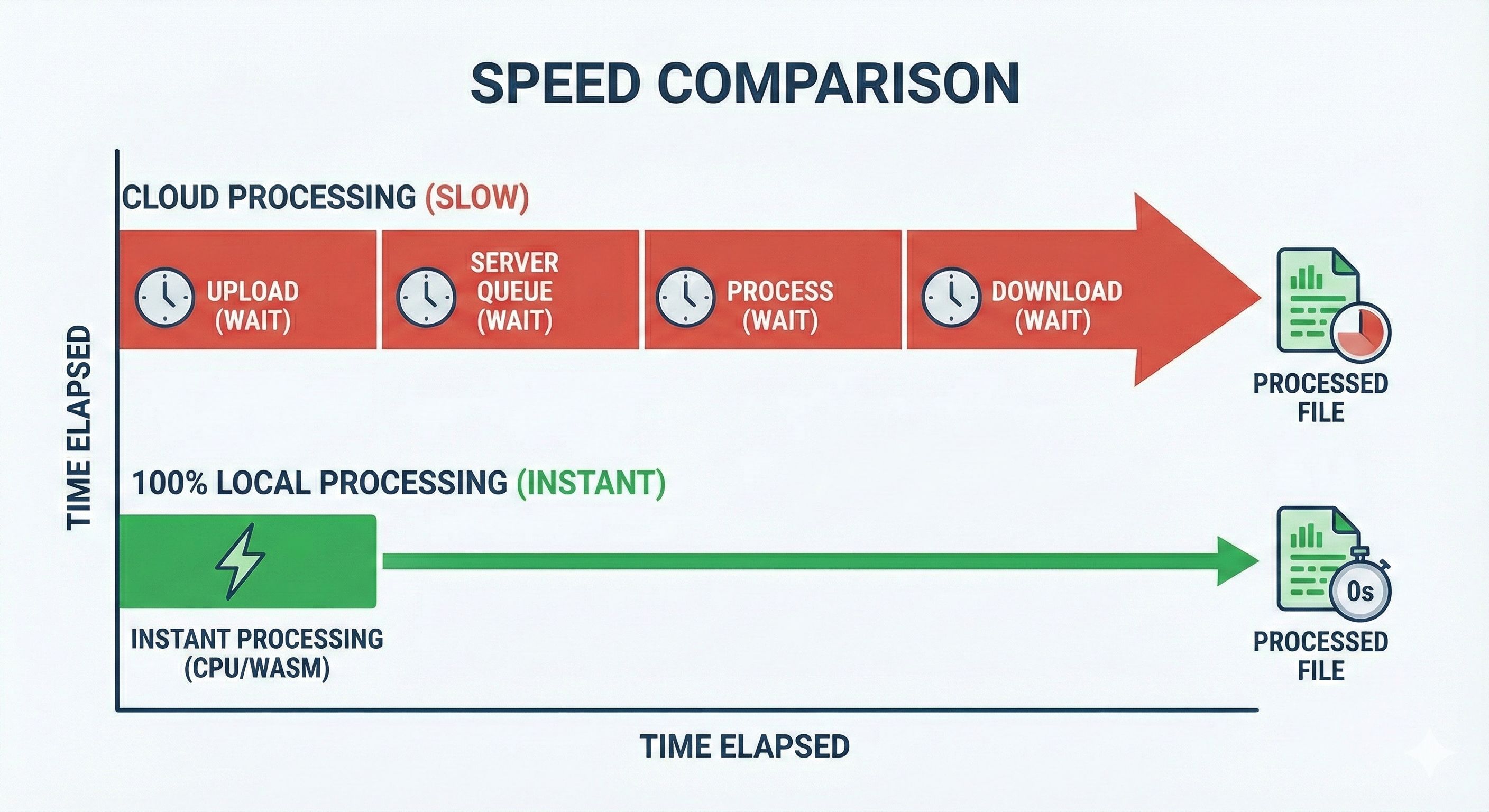
Think about trying to trim a small section out of a large video file using a cloud-based tool. You have to wait for the file to upload, wait for the server queue, wait for the processing, and then wait again to download the result.
With local processing, there is no upload and no download. The processing begins the exact millisecond you drag and drop the file. You bypass network bottlenecks entirely, resulting in near-instantaneous feedback.
In our testing, locally processed tools respond 10–50× faster than their cloud counterparts for typical file sizes — because the only constraint is your CPU, not a server queue 1,000 miles away.
What Is WebAssembly and Why Does It Make Local Processing Possible?
WebAssembly (Wasm) is a binary instruction format that allows code written in languages like C, C++, and Rust to run directly in the web browser at near-native speeds. It is the technology that makes serious local processing possible.
Historically, browsers relied entirely on JavaScript. JavaScript is fantastic for manipulating the DOM and building interactive UIs, but it struggles with heavy, CPU-intensive tasks like video encoding, complex image manipulation, or cryptography.
WebAssembly changes that. Instead of trying to force JavaScript to do things it wasn't built for, developers can now take powerful desktop-grade libraries — like FFmpeg for video or ImageMagick for photos — compile them to WebAssembly, and run them right inside your browser tab.
WebAssembly bridges the gap between web convenience and desktop power. It gives web applications the raw computational horsepower of native software, packaged with the frictionless accessibility of a URL. It is the exact technology that makes platforms like Lokaltools possible.
Learn more: WebAssembly vs Cloud Processing — What's the Difference?
Should You Rethink the Cloud Default?
We spent the last decade pushing everything to the cloud. For collaborative tools like Google Docs or massive shared databases, the cloud is absolutely the right choice.
But for personal utilities? For file converters, text manipulators, and code formatters? The cloud is overkill — slow, insecure, and unnecessarily complex.
The pendulum is swinging back. Compute power is cheap and abundant on local devices. The web browser is more capable than ever. We found that for single-user utility tasks, there is almost never a valid reason to involve a remote server.
Try It Yourself
Reading about local processing is one thing, but experiencing the speed and security firsthand is another.
At Lokaltools, we have built a massive suite of developer utilities, file converters, and text tools powered entirely by WebAssembly and client-side technology. No uploads. No server queues. No data retention. Just blazing fast, 100% private tools that run right in your browser.
Drop a file in, watch it process instantly, and experience the new standard for web utilities.
Frequently Asked Questions
What does "local processing" mean for a web tool? Local processing means the tool runs entirely in your browser on your own device. Your files and data are never uploaded to any server — all computation happens using your computer's CPU and memory.
Is a locally processed web tool actually private? WebAssembly and browser APIs make local file processing possible. They do not prevent a website or its scripts from accessing the network. Privacy depends on the implementation, the scripts loaded and the data actually transmitted.
Why do most free online tools use cloud servers instead of local processing? Historically, browsers were too limited for heavy computation. Developers relied on servers to do the heavy lifting. With WebAssembly now available in all modern browsers, that limitation no longer exists.
What is WebAssembly (Wasm)? WebAssembly is a binary instruction format supported by all modern browsers. It allows code written in languages like Rust, C, and C++ to run in the browser at near-native speed — making tasks like video processing, PDF manipulation, and complex file conversion possible entirely client-side.
Is local processing faster than using a cloud tool? In practice, yes — especially for common file sizes. There is no upload or download wait, no server queue, and no network round-trip. Processing starts immediately when you load your file and typically completes in seconds.
Can I use locally processed tools without an internet connection? Once the tool has loaded in your browser, yes. The code runs on your device, so an active internet connection is not required to process files. Many local tools work completely offline.
What kinds of tasks are best suited to local processing? File conversion (PDF, images, video), code formatting, text manipulation, password generation, hashing, and data transformation are all ideal candidates. Anything you do alone, with your own files, belongs on your device — not a stranger's server.