
The Privacy Risks of Free Online File Converters: What You Need to Know
Free online converters pose serious privacy risks. Learn why WebAssembly-powered local tools keep your files safe — no upload, no server, no data exposure.

The Privacy Risks of Free Online File Converters
Lokaltools file converters use JavaScript, browser APIs and WebAssembly where needed to process files on your device. Tool capabilities, offline availability and batch support vary. Optional consented analytics records tool use, never file content.
You’ve been there. You have a PDF that needs to be a Word doc, or a high-res TIFF that needs to be a snappy WebP for a site build. You do what everyone does: search "convert TIFF to WebP" and click the first result. It’s free, it’s fast, and it gets the job done.
But as a developer, you know the old adage: if you aren't paying for the product, you are the product. When you hit that "Upload" button, you’re doing more than just moving bytes; you’re handing over potentially sensitive data to a black box.
Let's talk about what actually happens behind that progress bar and why the "Upload-Process-Download" model is a relic that needs to die.
The Illusion of the "Temporary" File
Most free online converters claim they delete your files after an hour or 24 hours. While many reputable services (like CloudConvert) do follow strict GDPR guidelines, the "free" ecosystem is littered with fly-by-night sites that aren't nearly as disciplined.
Even with "good" actors, your data is at risk the moment it leaves your machine. Here’s why:
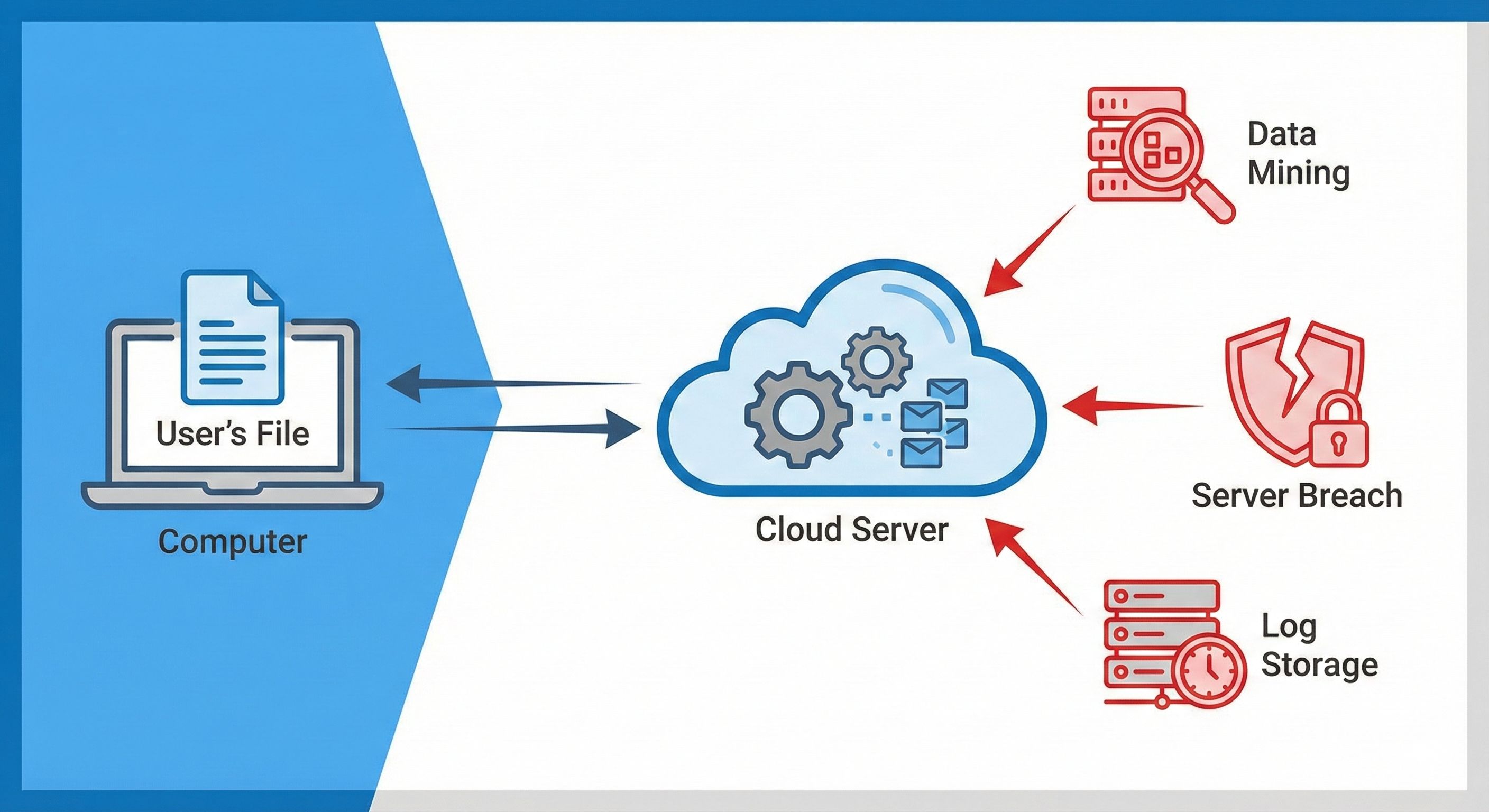
- Server Logs & Metadata: Even if the file is deleted, the server likely logs the filename, your IP address, your browser fingerprint, and the timestamp. For a sensitive legal document or a proprietary design, even the filename can be a leak.
- The "Shadow" Retention: Backups and cached versions of server storage might hold onto those "deleted" files longer than the UI suggests.
- Data Mining: Some services specifically scrape uploaded documents for structured data—think names, addresses, or even credit card numbers—to sell to advertisers or data brokers.
The Rise of Malware-Infested Converters
In early 2025, the FBI issued a warning specifically targeting free online file converters. Scammers have realized that people are in a "utility mindset" when they need a conversion. They just want the file.
These malicious sites often perform the conversion perfectly, giving you exactly what you asked for so you don't suspect a thing. Meanwhile, in the background, they:
- Inject Macros: If you're converting to a .docx or .xlsx, they can hide malicious macros in the output file.
- Bundle Trojans: The "Download" button might trigger a secondary download of a small executable or a script that installs a keylogger.
- Credential Scraping: If the file you uploaded contains passwords or sensitive keys (we’ve all seen developers upload .env files or SSH keys by mistake), they are indexed and sold within minutes.
Why "Cloud-Based" Is No Longer Necessary
Ten years ago, we uploaded files because browsers were weak. Converting a complex PDF or a massive video file required server-side CPU power that a 2015 browser just couldn't handle.
That has changed.
Enter WebAssembly (WASM) and the Canvas API
We now have the tech to do the heavy lifting directly in the browser's memory.
- WebAssembly (WASM): This allows us to run high-performance code (written in C++ or Rust) at near-native speeds inside your browser. When you use a tool on Lokaltools, you aren't "uploading" anything. The conversion logic is downloaded to your CPU, and it processes the file right there in your RAM.
- Canvas API: For image conversions, the browser's built-in Canvas API can manipulate pixels, resize images, and swap formats without ever needing to talk to a server.
The benefits are obvious: If the file never leaves your computer, it can't be stolen from a server.
Comparison: Cloud vs. Local Processing
| Feature | Traditional Online Converters | Lokaltools (Client-Side) |
|---|---|---|
| Data Privacy | High Risk (File leaves your device) | Files processed on your device; optional usage analytics |
| Speed | Dependent on Upload/Download speed | Depends on your device and the task |
| Offline Use | Impossible | Depends on cached tool dependencies |
| Security | Risk of server-side data breaches | No file upload; website security still matters |
| Cost | Often limited or "freemium" | Free core tools; optional paid plans |
How to Spot a "Fake" Private Tool
There are plenty of sites that claim to be private but still sneakily upload your data. As a dev, you have the ultimate BS detector: the Network Tab.
- Open your browser's DevTools (F12).
- Go to the Network tab.
- Upload a file to the converter.
- Look for any POST or PUT requests with a large payload.
File contents are processed locally. Loading the website or tool dependencies and using optional consented services can still make network requests. Check the payloads, not just whether a request exists; one inspection cannot guarantee future website behavior.
WebAssembly and browser APIs make local file processing possible. They do not prevent a website or its scripts from accessing the network. Privacy depends on the implementation, the scripts loaded and the data actually transmitted.
Speed: The Underrated Value of Local Tools
We talk a lot about privacy, but let’s be real: sometimes you just want it to be fast.
On a traditional site, if you have a 50MB image, you have to wait for it to upload (slow), wait for the server to queue and process it (variable), and then download the result (slow).
With a WebAssembly-powered tool, the only bottleneck is how fast your computer can read the file from your disk into its memory. On a modern machine, that's almost instantaneous. No more staring at a spinning "Processing..." wheel while a server in Virginia decides if it's too busy to help you.
Protect Your Workflow
As developers and tech-savvy users, we handle sensitive assets daily: client logos, internal documentation, proprietary code snippets, and personal photos. Using a random online converter for these is like leaving your house keys in the front door lock—you might get lucky, but why take the risk?
It's time to shift our habits. Treat "free" cloud converters with the same skepticism you'd treat a random .exe from a forum.
Try It Yourself
Stop being the product. If you need to convert images or manage files, do it where it’s safe: on your own hardware. Browse all privacy-first tools at LokalTools and convert images, compress files, or resize photos without ever uploading anything.
Frequently Asked Questions
Are free online file converters safe to use? It depends on which one. Reputable services with clear GDPR policies are generally low-risk for non-sensitive files. However, countless free converter sites have no meaningful data-retention policies, log your IP and filenames, or are outright malicious — in 2025 the FBI specifically warned about converter sites distributing malware through the output file. For anything sensitive, use a client-side tool that never uploads your data.
How can I tell if an online converter is actually private? File contents are processed locally. Loading the website or tool dependencies and using optional consented services can still make network requests. Check the payloads, not just whether a request exists; one inspection cannot guarantee future website behavior.
What happens to my files after I upload them to a free converter? Reputable services delete files after a short window (typically 1–24 hours), but server logs, backup snapshots, and cached storage often retain metadata longer than the UI implies. Less reputable services may never delete your data at all, and some explicitly harvest structured data (names, addresses, financial figures) from uploaded documents to sell to data brokers.
Can free online converters install malware on my computer? Yes — some malicious converter sites embed trojans or keyloggers in the converted output file, or trigger a secondary executable download when you click the "Download" button. They complete the conversion correctly so you don't suspect anything. This is why the FBI advisory specifically flagged converter sites as a malware distribution vector.
What is a client-side converter and why is it more secure? A client-side converter downloads the processing logic (usually compiled to WebAssembly) to your browser and runs the conversion entirely on your own CPU and RAM. Your file never leaves your device — there is no server to breach, no upload to intercept, and no data-retention policy to distrust.
Does using a local converter work without an internet connection? Depends on cached tool dependencies. File contents are processed locally. Loading the website or tool dependencies and using optional consented services can still make network requests. Check the payloads, not just whether a request exists; one inspection cannot guarantee future website behavior.
What types of files should I never upload to a free online converter? Avoid uploading anything containing personally identifiable information (passports, ID scans, tax documents), proprietary business files (unreleased designs, internal reports, source code), credentials (config files, .env files, SSH keys), or legal and medical documents. Once uploaded, you have no control over what happens to that data.