
What Is LokalTools and How Do You Get Started?
LokalTools is a free browser-based toolkit that processes files locally using WebAssembly — no uploads, no accounts, works offline. Here's how to use it.
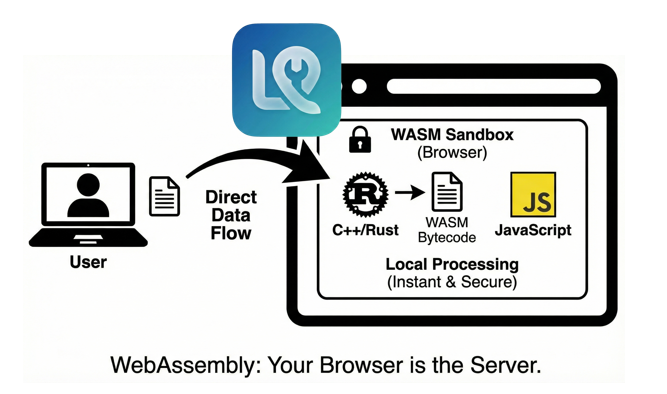
LokalTools is a free, browser-based toolkit that runs complex file processing — PDF editing, image conversion, video tools, and more — entirely on your device using WebAssembly (WASM). Your files never leave your machine.
Why Does It Matter That Tools Run Client-Side?
Most online tools upload your files to a server for processing. This creates two problems: privacy risk and speed dependency.
When your files go to a server, you lose control of them. You are trusting a third party not to log, cache, or misuse the content. For files containing personal information, financial records, or proprietary data, that trust is often unwarranted.
At LokalTools, we do things differently:
- Privacy First: Your files never leave your device. Zero uploads.
- Speed: We use WebAssembly (WASM) to run complex algorithms at near-native speeds, without a server round-trip adding latency.
- Offline Capability: Once the tool has loaded, it continues working without an internet connection. We found this especially useful in environments with restricted or unreliable connectivity.
What Is WebAssembly (WASM)?
WebAssembly is a binary instruction format that runs inside modern browsers at near-native performance. It allows code originally written in languages like Rust or C++ to execute inside your browser tab — the same browser you use every day — at speeds far beyond what standard JavaScript can achieve.
This is what makes LokalTools possible. Computationally heavy operations like PDF manipulation, image encoding, and video processing are handled by WASM modules running locally on your CPU, not a distant server.
What Tools Does LokalTools Offer?
LokalTools is organized into focused categories, each covering a common workflow:
- PDF Tools: Merge, split, compress, and edit PDFs securely. All processing happens in your browser with no third-party access to your documents.
- Image Tools: Convert between formats, resize, compress, and optimize images without quality loss.
- Video Tools: Fast browser-based video processing powered by FFmpeg WASM.
- Calculators: Precise tools for daily financial and productivity calculations.
In our testing, the browser-based processing is fast enough for the vast majority of everyday tasks — most image conversions and PDF operations complete in under a second.
How Do You Use a LokalTools Tool?
Using any tool follows the same simple pattern:
- Navigate to the tool you need (for example, the Image Converter).
- Drag and drop your file into the upload area, or click to browse.
- Configure your output settings.
- Download the processed file instantly.
There are no accounts to create, no email addresses required, and no file size limits enforced by subscription tiers.
Is LokalTools Really Free?
Yes. LokalTools is entirely free to use. Because processing happens on your device rather than our servers, there are no compute costs to pass on. The site is supported by non-intrusive advertising, and you are never upsold to a paid plan to unlock basic functionality.
Frequently Asked Questions
Do I need to create an account to use LokalTools? No. All tools are available immediately with no sign-up, no account, and no email address required.
Does LokalTools work offline? Yes, once the tool page has loaded. The WASM processing engine is downloaded to your browser on first load, after which you can disconnect from the internet and continue working.
Are my files stored anywhere? No. Files are processed entirely in your browser's memory and are never uploaded to any server. Closing the tab discards everything.
What browsers does LokalTools support? LokalTools works in any modern browser with WebAssembly support: Chrome, Firefox, Safari, and Edge. For the best performance, we recommend a current version of Chrome or Firefox on desktop.
Is LokalTools compliant with GDPR? Because no personal data or file content is ever transmitted to our servers during tool use, LokalTools is compatible with GDPR data minimization requirements. Consult your compliance team for your specific obligations.
What is the maximum file size I can process? There is no hard limit enforced by LokalTools, but your browser tab has a practical memory ceiling (typically 2–4GB depending on your device). Most everyday files — documents, photos, short video clips — are well within this range.
Can I use LokalTools on mobile? Yes. The tools are designed to work on mobile browsers. For heavy operations like video processing, a desktop or laptop will be faster due to greater CPU and memory resources.