
PDF Metadata Editor
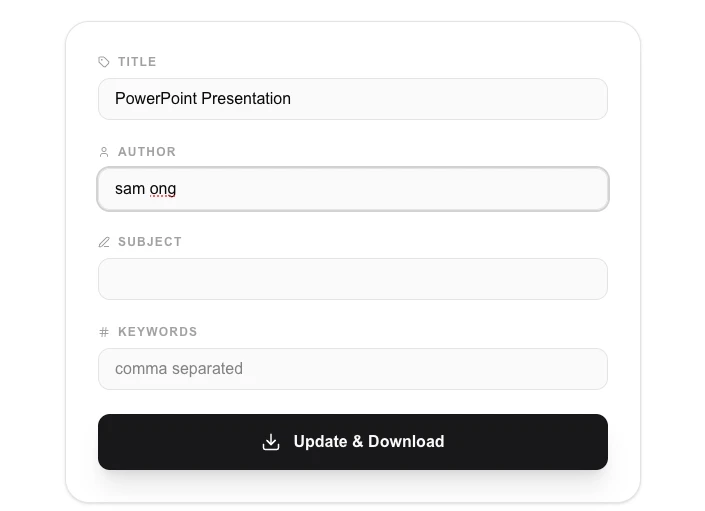
View and edit metadata (title, author, keywords) of your PDF files.
About PDF Metadata Editor
Optimize your PDF files for indexing and professionalism by editing their internal metadata. Change the document title, author, subject, and keywords to ensure your files look great in PDF viewers and search results.
How to Use
- Upload the PDF document you want to inspect or edit.
- Review or update the fields for 'Title', 'Author', 'Subject', and 'Keywords'.
- Click 'Apply Changes' to write the new metadata into the PDF header.
- Download the updated PDF with its professional new identity.
Common Use Cases
- Ensuring professional 'Author' and 'Title' info appears in PDF reader title bars.
- Improving local searchability of your documents by adding detailed 'Keywords'.
- Cleaning up metadata from personal documents before formal submission.
Technical Details
Modifies the PDF Information Dictionary and Metadata streams using pdf-lib. All edits happen within your browser's RAM, ensuring 100% local privacy.
Frequently Asked Questions
- Does it affect PDF content?
- No, this tool only changes the background 'description' data of the PDF, not the actual text or images on the pages.
- Are keywords useful?
- Yes, many file indexing systems and some search engines use PDF keywords to better understand the document's relevance.
- Can I clear or blank out all metadata at once?
- Yes. You can leave any metadata field empty before saving. The tool will write an empty string for that field, effectively clearing it from the PDF's document information dictionary.
- Will editing metadata affect PDF bookmarks or links?
- No. Metadata fields (title, author, subject, keywords, dates) are stored separately from the PDF's content, structure, and navigation elements. Editing them has no effect on bookmarks, hyperlinks, or page content.
- Why would I want to edit PDF keywords?
- Keywords embedded in PDF metadata help desktop search tools (like macOS Spotlight or Windows Search) index and surface your files faster. They are also read by some document management systems and library catalogues for categorisation.
- Can I set or remove the Author and Creator fields to anonymize a PDF?
- Yes. The PDF Metadata Editor lets you clear or overwrite the Title, Author, Subject, Keywords, Creator, and Producer fields. Setting these fields to empty strings effectively anonymizes the document, removing information about who created it and which software was used. This is useful before sharing documents publicly, submitting anonymous academic work, or distributing client-facing materials. All metadata editing is done in your browser using PDF-lib — no file is uploaded to any server.
Local processing
Our local file, text and chart tools process content on your device using JavaScript, browser APIs and, where needed, WebAssembly. Our usage events do not include filenames, file contents, input text, chart values, raw errors, emails or license references. Network lookup tools (such as DNS, WHOIS, IP and speed tests) contact external services for their stated purpose. Loading the website, fonts, libraries and models also makes network requests. WebAssembly itself does not prevent network access.