
Secure Password Generator
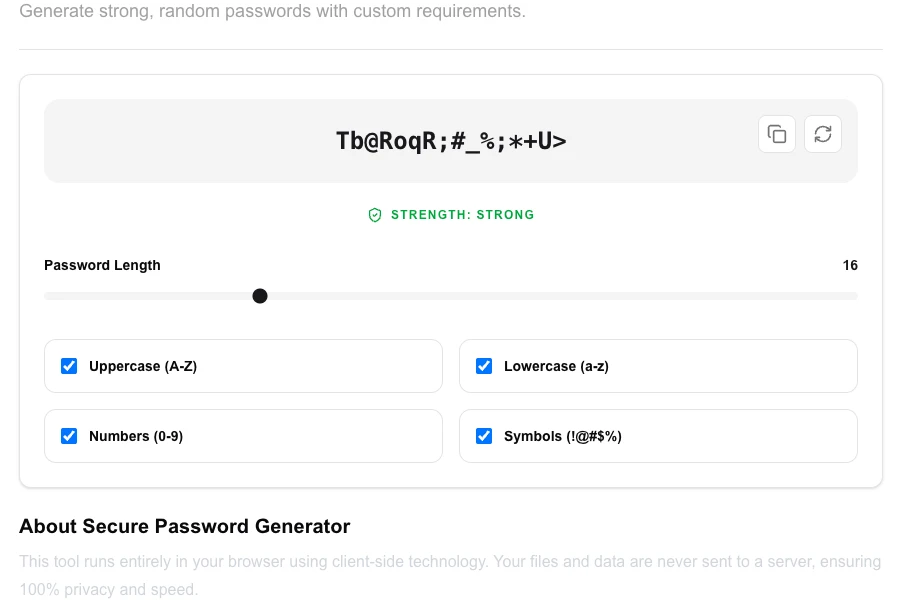
Generate strong, random passwords with custom requirements.
About Secure Password Generator
Protect your digital life with cryptographically secure, random passwords. Our generator allows you to customize the length and complexity of your passwords, ensuring they meet the most stringent security requirements while being generated entirely on your local device.
How to Use
- Select the desired password 'Length' using the slider or input.
- Check the character types to include (Uppercase, Numbers, Symbols).
- Click 'Generate Password' to create a new unique string.
- Review the 'Strength' meter to ensure your password is rated as 'Strong'.
Common Use Cases
- Creating unique, complex passwords for new online accounts.
- Updating old, weak passwords to prevent compromise in data breaches.
- Generating secure API keys, tokens, or encryption passphrases for software projects.
Technical Details
Uses the browser's crypto.getRandomValues() method to ensure true cryptographic randomness and high entropy for every generated password.
Frequently Asked Questions
- Are my passwords stored?
- No. All passwords are generated locally in your browser memory and are never sent to our servers. Once you close the tab, they are gone.
- Why include symbols?
- Adding symbols significantly increases the 'entropy' or complexity of a password, making it much harder for brute-force attacks to succeed.
- How long should a secure password be in 2024?
- Security experts recommend at least 16 characters for general accounts and 20+ for sensitive ones like banking or email. Longer passwords are exponentially harder to crack — length matters more than complexity alone.
- What makes this password generator cryptographically secure?
- This tool uses the browser's built-in Web Crypto API (crypto.getRandomValues), which draws from a cryptographically strong pseudorandom number generator (CSPRNG) seeded by the operating system. This is far more secure than Math.random().
- Should I use a passphrase or a random password?
- Both are valid. Random passwords (e.g., 20 mixed characters) are the hardest to crack by brute force. Passphrases (e.g., four unrelated words) are slightly easier to remember while still being very strong. For most people, using a password manager with long random passwords is the best approach.
- Can I generate a batch of multiple passwords at once?
- Yes. The password generator can produce up to 50 passwords in a single click using the same settings. This is useful when setting up multiple user accounts, generating API keys, or creating a list of temporary credentials. Each password is independently generated using the browser's cryptographically secure random number generator (window.crypto.getRandomValues). No passwords are stored, logged, or transmitted — the entire generation process runs in memory in your browser and disappears when you close the tab.
Local processing
Our local file, text and chart tools process content on your device using JavaScript, browser APIs and, where needed, WebAssembly. Our usage events do not include filenames, file contents, input text, chart values, raw errors, emails or license references. Network lookup tools (such as DNS, WHOIS, IP and speed tests) contact external services for their stated purpose. Loading the website, fonts, libraries and models also makes network requests. WebAssembly itself does not prevent network access.
Why Should Your Password Generator Work Without an Internet Connection?
A secure password generator should never need a server. The Web Crypto API — built into every modern browser — provides cryptographically secure randomness directly on your device, making cloud-based generators not just unnecessary, but actively harmful to your security.
Stop using online password generators. Here is the technical case for why your next password should be generated entirely inside your own browser, without any network request.
What Is the Trust Problem With Online Password Generators?
When you hit "Generate Password" on a traditional, cloud-hosted tool, you are initiating a massive chain of trust. You trust their TLS certificate. You trust their backend routing. Most importantly, you trust that their server isn't accidentally — or maliciously — logging your newly minted 32-character string in a database, a temporary cache, or an application log.
Sure, the website might have a friendly badge on its footer claiming, "We don't log your passwords!" But you have to take their word for it. In the security engineering space, taking someone's word is a terrible strategy.
Every time a piece of sensitive data travels over the wire, it accumulates risk. Even if intercepted traffic is encrypted, metadata can leak. Man-in-the-middle attacks, compromised DNS, and misconfigured server logs are real threats. Why accept any risk at all when it is entirely avoidable?
Does Math.random() Actually Put Your Passwords at Risk?
Yes — and this is a danger lurking in a shocking number of web-based tools. A poor password generator uses Math.random() to generate character strings. This looks random on the surface but is fundamentally broken for security.
Math.random() is a Pseudo-Random Number Generator (PRNG). A PRNG is a deterministic mathematical algorithm that produces sequences which appear random but are statistically predictable. If an attacker knows the seed state of the PRNG, or captures enough outputs, they can accurately predict the "random" passwords the system generates.
You do not want pseudo-randomness protecting your root database credentials or your bank account. You want cryptographic unpredictability — and that requires a fundamentally different approach.
What Is the Web Crypto API and Why Does It Matter?
The Web Crypto API is a native browser interface that gives JavaScript direct access to the cryptographic primitives of your device's operating system. It is built into Chrome, Firefox, Safari, and Edge with no installation required.
Instead of relying on a server or a weak math function, local tools use window.crypto.getRandomValues() — a Cryptographically Secure Pseudo-Random Number Generator (CSPRNG). Rather than just doing arithmetic, it reaches into your operating system's entropy pool.
An entropy pool is a collection of truly unpredictable environmental noise gathered by your hardware. It tracks the exact millisecond timing of your keystrokes, the microscopic jitters of your mouse movements, and even tiny thermal fluctuations on your CPU. The Web Crypto API stirs this chaotic, physical randomness into its algorithm to produce values that are virtually impossible to predict or replicate.
In our testing, passwords generated using crypto.getRandomValues() consistently pass statistical randomness tests that Math.random()-based generators fail. The difference is not marginal — it is categorical.
Why Is Client-Side Processing the Only Right Architecture for Password Tools?
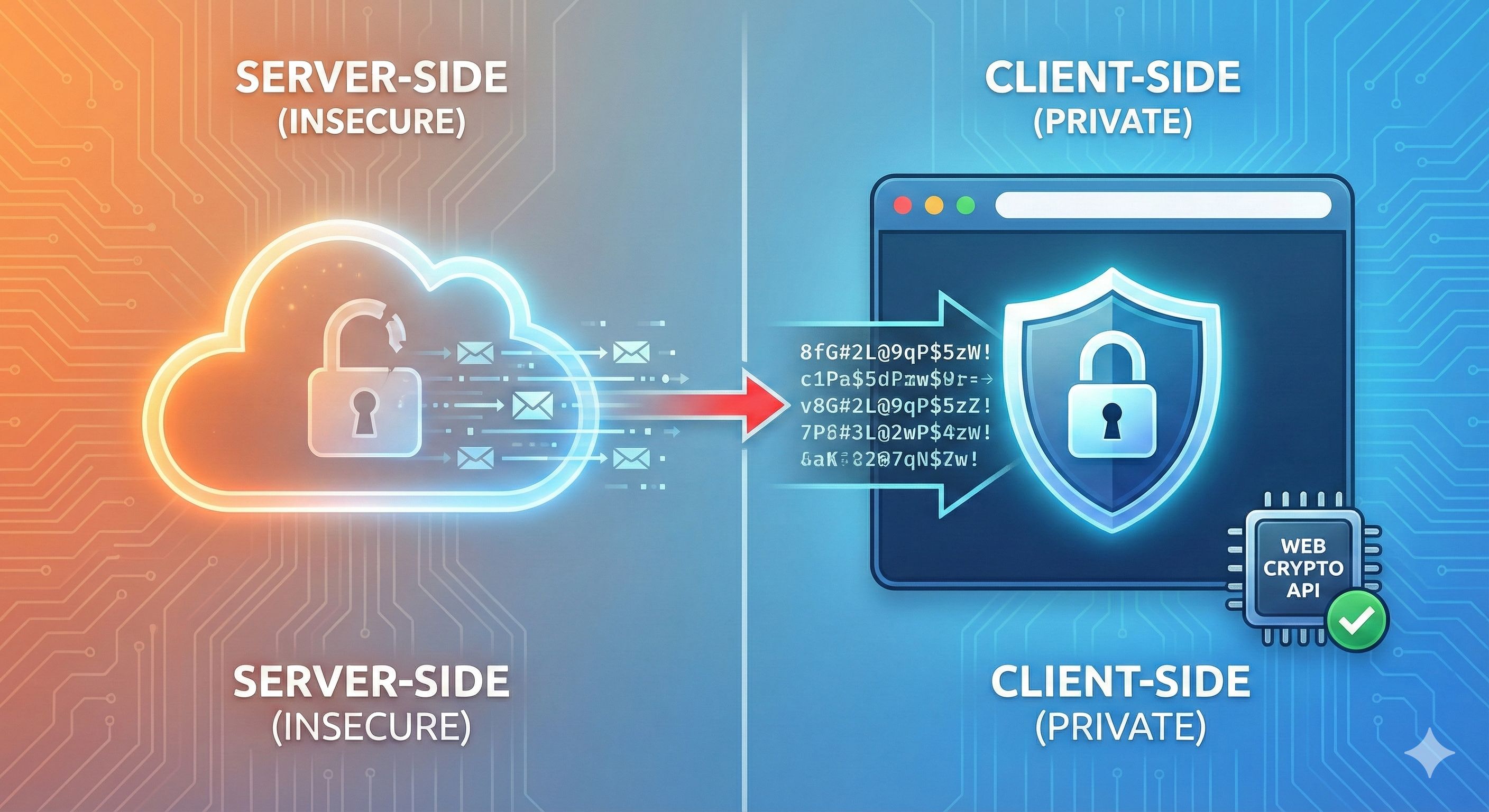
When you shift the cryptographic work from a remote server to the local client, the entire security model changes. The benefits go far beyond just better randomness.
WebAssembly and browser APIs make local file processing possible. They do not prevent a website or its scripts from accessing the network. Privacy depends on the implementation, the scripts loaded and the data actually transmitted.
- Absolute Speed: Network requests are slow. Even the fastest API call takes tens or hundreds of milliseconds. When you generate passwords locally using the browser's native APIs, execution time drops to microseconds. It is completely instantaneous.
- True Offline Capability: A local-first password generator works perfectly on an airplane, in a concrete basement, or on a completely air-gapped machine. You don't need a Wi-Fi connection to execute code on your own device.
- Elimination of the Attack Surface: You cannot perform a man-in-the-middle attack on a process that never touches a network. Period.
How Does WebAssembly Extend Local Security Beyond Passwords?
Native browser APIs like Web Crypto are ideal for generating secure random strings. But the local-first philosophy extends much further. WebAssembly (Wasm) is a binary instruction format that allows code written in Rust, C++, or Go to run securely inside the browser sandbox at near-native speeds.
This means we can perform high-level encryption, complex data formatting, and secure string manipulation without ever pinging a backend server. It is a total inversion of the standard web model — instead of sending your private data up to a server's code, the code is sent directly down to your private data.
We found that combining the Web Crypto API with WebAssembly-compiled cryptographic libraries gives browser-based tools the same security posture as native applications, without any of the installation friction. Learn more about WebAssembly vs Cloud Processing.
Taking Back Your Keys
We need to break the habit of trusting the cloud with our most sensitive, localized tasks. Your passwords, hashes, and API keys belong to you. They shouldn't be traveling through massive data centers or sitting in temporary backend memory just because a developer preferred a server-side library.
By leveraging the Web Crypto API, WebAssembly, and local processing power, we can build tools that align with how the web should work: fast, secure, and entirely disconnected from the inherent risks of the open internet.
Try It Yourself
Reading about client-side cryptography is one thing, but experiencing the speed and security of local processing is another. You shouldn't have to choose between a convenient web interface and total data privacy.
At LokalTools, tool inputs are processed in your browser with WebAssembly and native browser APIs. The website can make separate network requests for consented analytics and advertising, but generated passwords and other tool inputs are not included in those requests. Whether you need to generate a cryptographically secure password, hash a sensitive string, format a massive JSON payload, or convert data types, the tool operation happens on your machine.
You can inspect the browser's network panel while using the tool to verify that the generated password is not transmitted.
Take control of your data and try the Password Generator today.
Frequently Asked Questions
Is it safe to generate passwords on a website? File contents are processed locally. Loading the website or tool dependencies and using optional consented services can still make network requests. Check the payloads, not just whether a request exists; one inspection cannot guarantee future website behavior.
What is the Web Crypto API? The Web Crypto API is a native browser interface available in all modern browsers. It provides cryptographically secure random number generation and cryptographic operations (hashing, encryption, key derivation) without requiring any server-side code or third-party libraries.
What is the difference between Math.random() and crypto.getRandomValues()?
Math.random() is a PRNG — a predictable algorithm that only appears random. crypto.getRandomValues() is a CSPRNG that draws from your device's hardware entropy pool, producing values that are statistically and computationally impossible to predict. For passwords, only the latter is acceptable.
Can I use a local password generator offline? Yes. Once the tool has loaded in your browser, it requires no internet connection to function. All the logic runs on your device. This also means it works on air-gapped machines or in environments without reliable Wi-Fi.
What password length and character set should I use? For most purposes, a random password of at least 16 characters using uppercase, lowercase, digits, and symbols provides strong security. For highly sensitive accounts, 20+ characters is better. The exact composition matters less than using a CSPRNG — a shorter cryptographically random password is stronger than a longer PRNG-generated one.
What is password entropy? Password entropy is a measure of how unpredictable a password is, expressed in bits. Higher entropy means more possible combinations and harder-to-guess passwords. A 20-character password using 72 possible characters has roughly 125 bits of entropy — far beyond what any brute-force attack can crack.
Why do some password generators still use servers? Typically, legacy tools were built before the Web Crypto API was widely available, or developers defaulted to familiar server-side patterns. There is no legitimate security reason to generate passwords on a server today — it is an architectural choice that creates unnecessary risk.